

When an animal has been removed from the farm, it can no longer be found directly using the UNIFORM search bar (at the top left of your screen) in your UNIFORM program. Once removed, the animal becomes a historical animal. But how can you access the Animal Record of a historical animal?
Go to 1.2 Animal Record and click the magnifying glass icon:
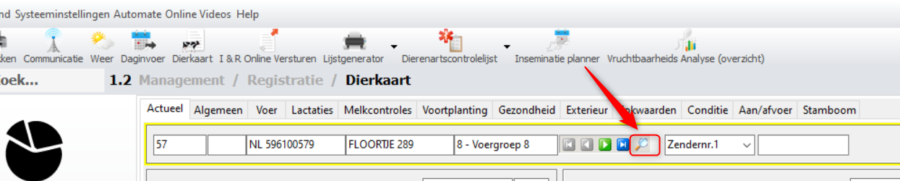
The following screen will then open:
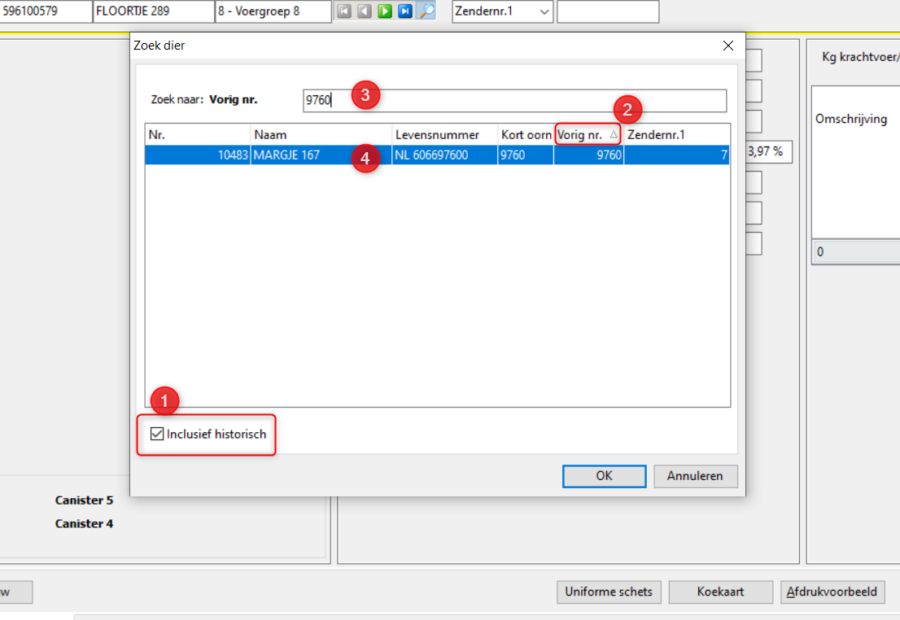
Here, you can tick the checkbox [Include historical] (1), then click on the item you want to search by. In this example, [Previous no.] (2) is used. Next, enter the previous animal number (3). If everything is correct, the animal you are looking for should appear.
As you can see, a completely different number now appears at the beginning of the row. If you click on it (3), you will open the Animal Record of the removed animal, where you can find all its information.


