

Do you sometimes notice that an animal is assigned to the wrong category on the Dashboard? For example, a calf you want to keep might still be listed under Calves to Sell, or a herd bull might be incorrectly categorized the same way. How do you correct this?
Below, we explain how to change the animal category in two common situations:
1. From Calves to Sell to Youngstock (Dairy Cows)
- Go to the animal record of the calf currently listed under Calves to Sell.
- Click [Edit] in the lower-left corner.
- Navigate to the second tab: [Pedigree Details].
- Change the animal category from [Calves to Sell] to [Dairy Cows]. The animal will now automatically appear under the Youngstock section on the Dashboard.
- Click [OK] to save the changes.
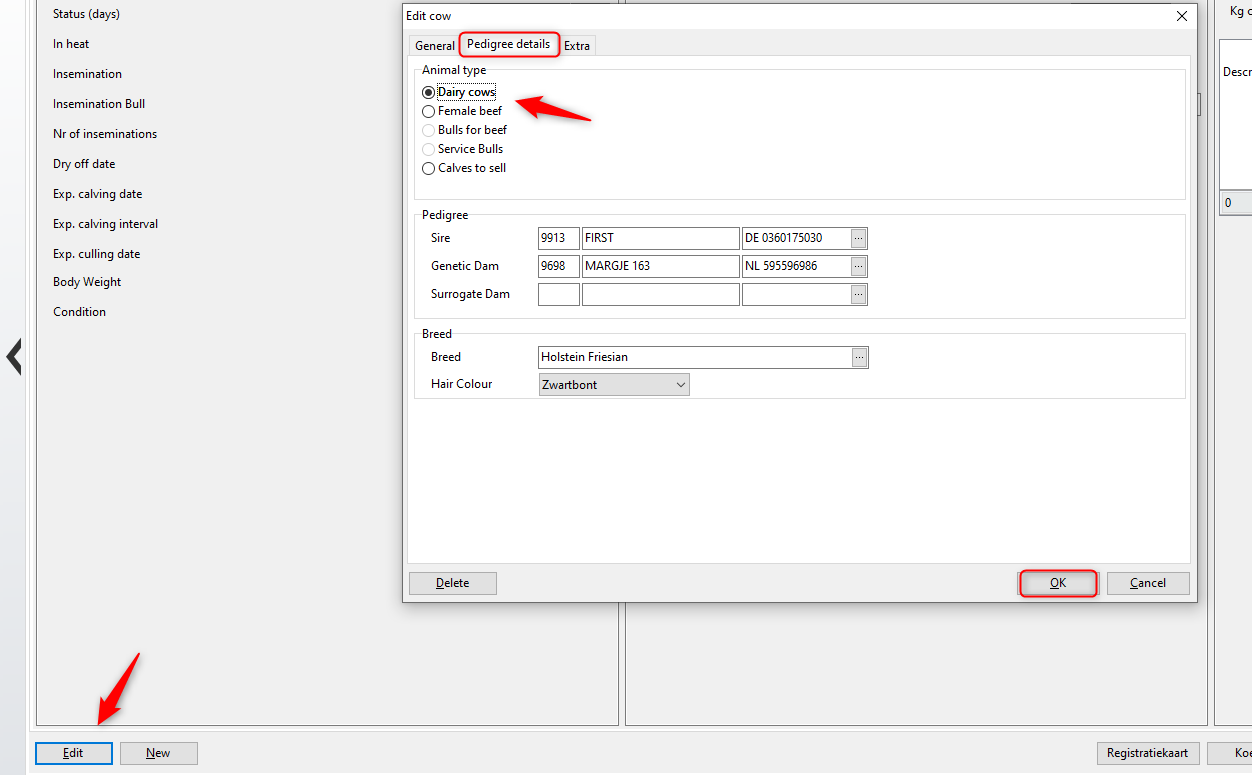
Return to the Dashboard, and you’ll now see the animal listed under the correct category.
2. From Calves to Sell to Service Bulls
- Go to the animal card of the calf.
- Click [Edit] and open the [Pedigree Details] tab.
- Change the category to [Service Bulls].
- Optionally, check the box labeled [Use as service bull] to ensure the animal is available when entering a natural mating or grazing record.
- Click [OK] to save the changes.

After saving, return to the Dashboard to confirm the animal is now correctly categorized.


