

It is important for every user that the UNIFORM program performs the automatic tasks properly and especially the automatic task Backup. If your PC always makes a backup at the chosen times and you have for example a computer crash (all data is normally lost), then we have a recent backup available. The backup in which all your animal data is stored!
Where can I find the automatic task backup and check if data safe is turned on?
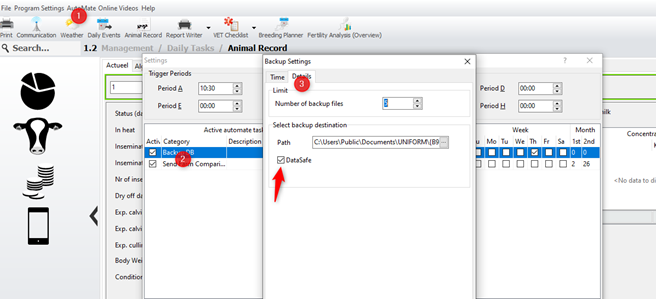
First go to [Automate] (1), then you will see the Automate Tasks, click on the Backup task (2) here you can also see which period/time he creates a backup, click on the second tab [Details] (3). The box before [DataSafe] must be ticked:
In which situation will creating backup fail?
- The PC is off or turns off
- The hard drive of the pc goes in sleep mode (after…minutes)
In both situations your PC don’t make a backup. You can also see this by a blinking red 1 or 2 at the top right of your Dashboard.


