














The UNIFORM App is available for both Apple and Android devices. Simply search for “UNIFORM“ in your device’s app store and download the app.
How to add a new user or edit a password
On your computer, open the app settings on the left hand side of the program.
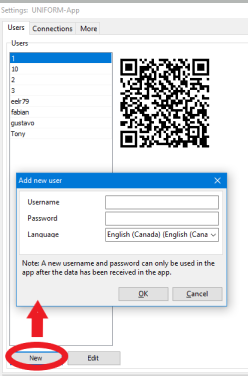
Here you can add users with the [New] button. Set a username and password to begin. Click OK to save your changes.
Similarly, you can edit existing users with the [Edit] button. This would be the way to reset your password if needed. You can also delete a user if it is no longer needed.