

Viewing Tasks and Actions in the Action Calendar
On the ‘Dashboard’, you can find an action list for [Heat], [Pregnancy Check], [To Dry Off], and [Tasks]. It’s also possible to view all actions clearly in a calendar view. In this helpdesk tip, we’ll show you how to access this and what information it displays.
On the ‘Dashboard’, click the gear icon to the right of [Tasks], then check [1.3.11 Action Calendar]:
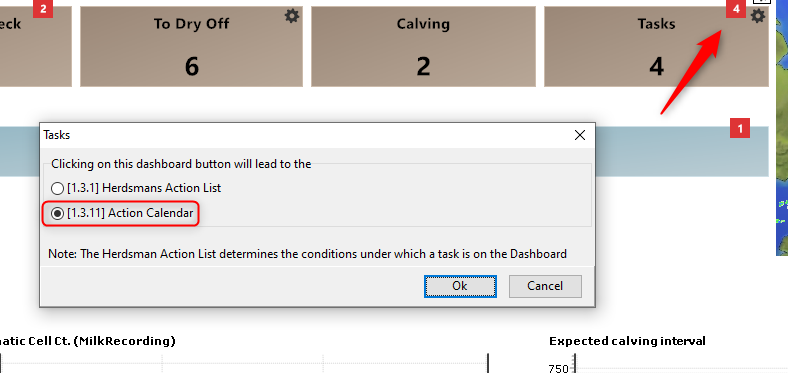
Now, when you click the [Tasks] button, the Action Calendar opens. You’ll see a weekly overview, with the current day highlighted. Below the calendar, you’ll find the actions relevant for today.
Under [Properties], you can select which tasks you want to have active. By clicking [i] in front of the numbers, you’ll immediately see which animals are involved.
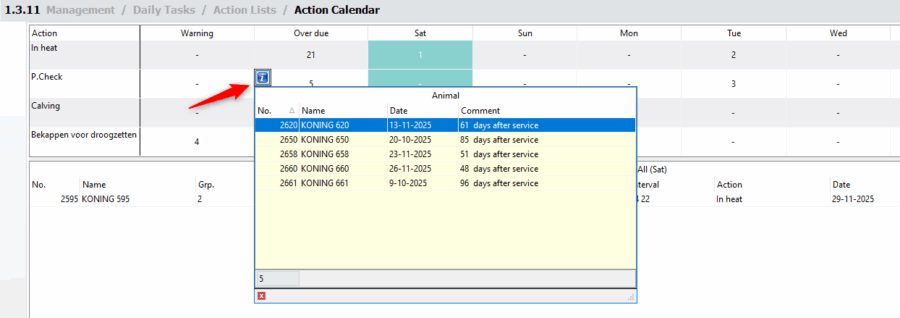
If you click on an action (vertical line), you’ll see a list of animals affected by that action for the entire week, along with the relevant dates.
If you need more help, please contact our helpdesk. For more information about our program, you can also watch our demo videos or sign up for a webinar.


