

From Dry-off Attention List (Dashboard) to Cows to Dry Off [4.10.4]
Via the dashboard buttons you normally open an attention list. However, for drying off cows you also have the option to display a different list. In this Helpdesk Tip we show you how this works.
On the dashboard, first click the small gear icon to the right of the Dry off button.
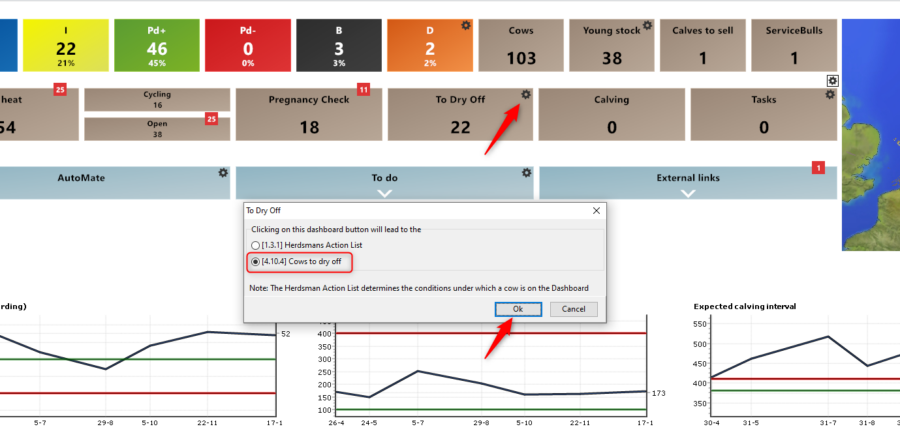
A new window will appear. Here you can select the second option and confirm by clicking [OK]. The number 22 (animals to dry off) will not change, because this number remains linked to the animals shown in the Dry-off attention list.
If you now click the To Dry off button on the dashboard again, a different list will be displayed [4.10.4] with additional information compared to the dry-off attention list.

For example, this list gives you more insight into the somatic cell count values (the last three before drying off) and also shows the treatment advice regarding whether or not an antibiotic treatment is recommended. The last milk production and the number of calves in the pregnancy are also shown.
Via the [Properties] button in the bottom right corner, you can still adjust several settings, such as the number of days ahead, specific groups to include or exclude, somatic cell count thresholds (when it is considered elevated), and the milk production display.
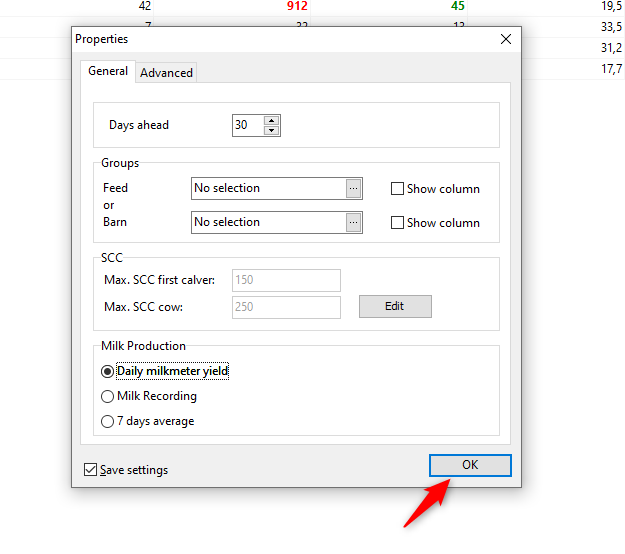
If you change any settings, make sure to tick [Save settings] and click [OK].
If you have any further questions about this list, please feel free to contact our helpdesk.


